Series and Parallel Battery Banks: A Worked PVAlign Example
Open a battery-bank circuit, calculate its nominal voltage and energy, and compare the results with checked PVAlign readings at 50% charge and no load.
Guide · October 29, 2026 · 6 min read
Two 12.8 V, 100 Ah batteries can form a 25.6 V, 100 Ah series bank or a 12.8 V, 200 Ah parallel bank. Both pairs have the same nominal energy: 2,560 Wh, or 2.56 kWh. Changing the connection changes voltage and amp-hour capacity; it does not create extra stored energy.
This worked example lets you check those relationships in PVAlign's online 2D solar PV circuit simulator. It also explains why a meter can show a voltage above the battery's nominal rating.
Open the battery-bank example. For a fixed copy of the project used for these checks, download the reference circuit JSON.
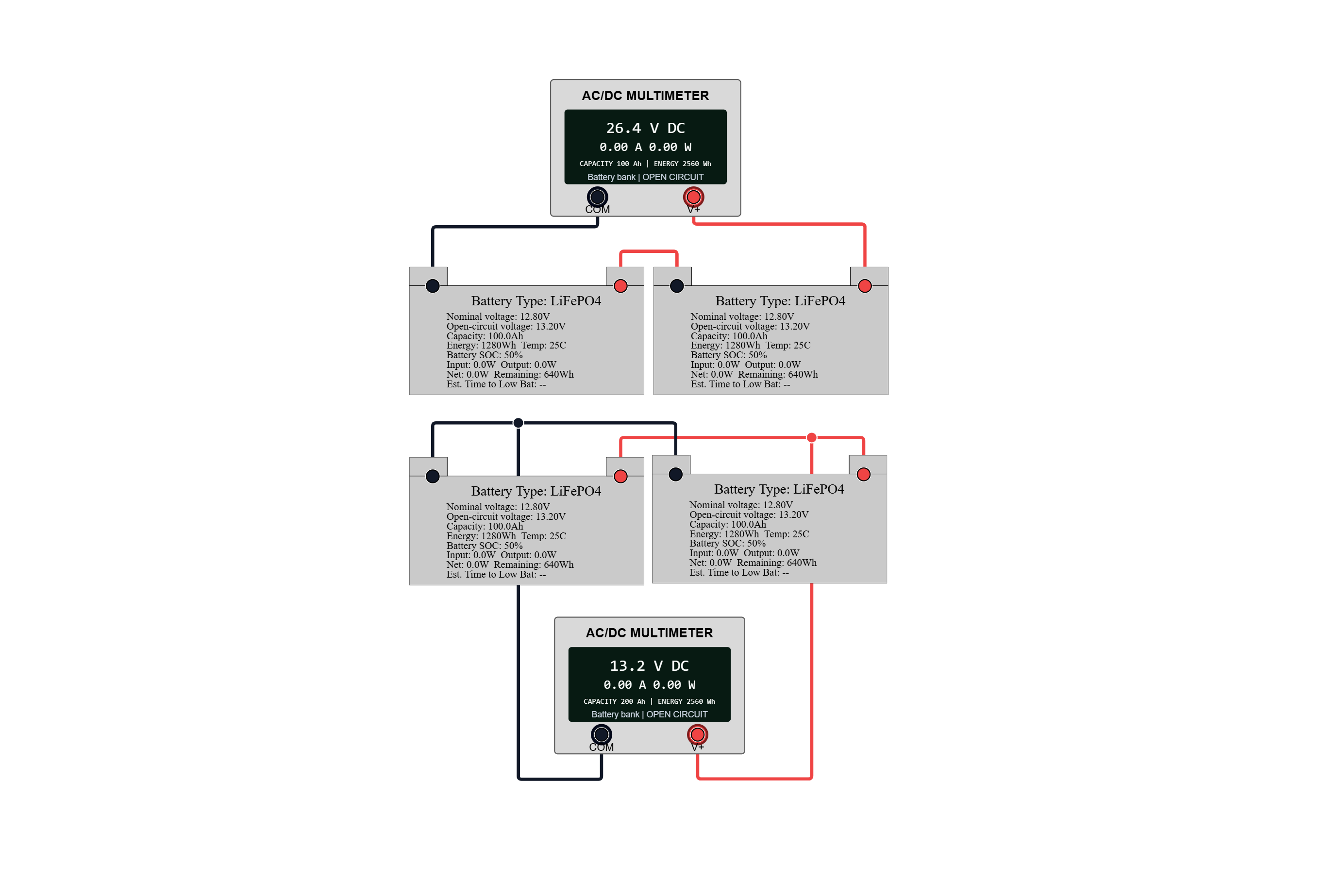
What is in the reference project?
The project contains four batteries arranged as two electrically separate banks, with a multimeter across each bank. It is not a single bank of four batteries.
| Input | Reference setting |
|---|---|
| Battery chemistry | LiFePO4 |
| Nominal rating of each battery | 12.8 V, 100 Ah |
| Initial state of charge | 50% for all four batteries |
| Battery temperature for the check | 25 °C |
| Upper bank | Two batteries in series |
| Lower bank | Two batteries in parallel |
| Measurement | A high-impedance multimeter across each bank |
| Charger or external load | None |
| Elapsed simulation time for the check | Zero |
The shared project is convenient to open in a browser. The downloadable reference preserves the specific inputs checked here if the shared version is edited later. In the 2D workspace, use Menu → Import to open the downloaded JSON. Export any work you need to keep before replacing the current circuit, or use the new-tab Import action.
Calculate the nominal values first
For one battery, nominal energy is voltage multiplied by amp-hour capacity:
12.8 V × 100 Ah = 1,280 Wh = 1.28 kWh
For the series pair, voltages add while the matched batteries' amp-hour capacity remains 100 Ah:
Nominal voltage = 12.8 + 12.8 = 25.6 V
Capacity = 100 Ah
Nominal energy = 25.6 × 100 = 2,560 Wh
For the parallel pair, nominal voltage remains 12.8 V while the matched batteries' amp-hour capacities add:
Nominal voltage = 12.8 V
Capacity = 100 + 100 = 200 Ah
Nominal energy = 12.8 × 200 = 2,560 Wh
At the initial 50% charge setting, the model accounts for 1,280 Wh of stored energy per pair, before operating limits and conversion losses. That is not a promise of usable AC energy or appliance runtime. See the battery capacity guide for the distinction between rated capacity, stored energy, and usable output.
Compare with the simulator readings
With the reference settings, the simulation engine produces these no-load readings:
| Check | Series pair | Parallel pair |
|---|---|---|
| Nominal voltage from the ratings | 25.6 V | 12.8 V |
| Modeled terminal voltage | 26.3936 V | 13.1968 V |
| Meter voltage rounded to two decimals | 26.39 V | 13.20 V |
| Reported capacity | 100 Ah | 200 Ah |
| Reported nominal energy | 2,560 Wh | 2,560 Wh |
| Current drawn by the idealized meter | 0 A | 0 A |
| Delivered load power | 0 W | 0 W |
Why is the voltage different from 25.6 V or 12.8 V? Nominal voltage is a rating, not a fixed meter reading. PVAlign's LiFePO4 open-circuit model gives each battery 13.1968 V at this charge setting. The series meter therefore sees twice that voltage; the parallel meter sees the common voltage of the matched pair.
These values describe the implemented model. They are not laboratory measurements, and the extra decimal places do not establish real-world accuracy. A real battery's terminal voltage depends on its particular cells, temperature, recent charging or discharging, and load.
Reproduce the check
- Open the shared example, or import the downloaded reference into the 2D simulator.
- Inspect all four batteries. Confirm 12.8 V, 100 Ah, LiFePO4, and 50% charge.
- Use 25 °C battery temperature and keep external loads and charging sources disconnected for this comparison.
- Select the upper multimeter and compare its voltage, capacity, and energy readings with the series column.
- Select the lower multimeter and compare with the parallel column.
- Change both batteries in one pair to the same different charge percentage. Its terminal voltage should change while its nominal voltage and amp-hour ratings remain the same.
If your readings differ, check the project version, battery chemistry, charge percentage, temperature, and whether a load or charging source has been added. Comparing a loaded battery with this no-load reference is a different experiment.
What was checked, and what was not?
For this example, the reference circuit was run through PVAlign's simulation engine. Automated checks compare its series and parallel topology, capacity, nominal energy, terminal voltage, and zero-load current and power with the values above. They also check that the series voltage is twice the parallel voltage and that changing both pairs' charge setting changes terminal voltage without changing their nameplate energy.
This is an internal software calculation check, not independent validation against physical battery measurements. It does not validate loaded current sharing, protection coordination, fault behavior, runtime, or every component in PVAlign. The simulation methodology explains the broader modeling approach and limitations.
This project isolates a voltage-and-capacity comparison; it is not an installation plan. Real battery interconnection requires manufacturer-approved series or parallel operation and suitable protection, conductors, and equipment ratings.
For a different solar-system exercise, explore series versus parallel PV panels or open the 3D solar simulator to study equipment placement, cable routing, sun position, and shading.
Test the variables in PVAlign
Open a reference circuit, then change one input at a time—such as irradiance, temperature, component rating, wiring, or load—and compare the simulated voltage, current, power, losses, and operating state.