PV / 01 · Solar field notes & tools
Build solar circuits.
Learn from solar guides, build clear wiring diagrams in the 2D circuit canvas, or place equipment and route cables in the new 3D solar simulator. Explore how panels, batteries, inverters, protection, and loads work together.
Browse the library · Open 2D simulator · Open 3D simulator · Plan a project budget
- 22 guides in the library
- Free simulator workbench
- 11 reports from the news desk
A working solar farm — from module to grid.
2D & 3D workspaces
Choose your solar simulator workspace
PVAlign now has two ways to build and explore solar power systems. Use the 2D circuit canvas for a clear wiring overview, or work with equipment and cables in the new 3D simulator.
Now available
3D solar simulator
Build a solar installation as an interactive 3D scene, with equipment you can position and terminals you can wire.
- Position and rotate components, then connect them with routed cables.
- Use Walk mode to explore the scene and inspect component or wire readings.
- Save and reopen 3D project files, and render the current view as a PNG.
Circuit canvas
2D circuit simulator
Start with a wiring diagram or reference circuit to understand the electrical paths through a solar power system.
- Connect sources, storage, conversion equipment, protection, meters, and loads.
- Adjust component ratings and inspect modeled voltage, current, losses, and warnings.
- Explore reference presets and shared 2D circuits alongside the screenshot guide.
Each workspace has its own project files and saving controls. Reopen a saved project in the workspace that created it.
Start here / 01—03
Three ways to get closer to the current.
Use PVAlign as a reading room, a test bench, or a window into what is changing across the industry.
Learn the fundamentals
Plain-language tutorials, from first principles to system-level decisions.
Build on the workbench
Connect photovoltaic panels, storage, wiring, and household loads in a complete solar power circuit.
Follow the industry
Useful reporting on renewable technology, research, and deployment.
Field lesson / 04
A visual guide to the 2D workspace.
Follow these steps in the 2D circuit simulator. For the 3D workspace, start with Add objects, connect terminals in Wire mode, and use Walk to explore your scene.
- Add components from the sidebar to the 2D canvas.
- Click one terminal and then another to connect a wire.
- Select a component to edit its specifications and inspect readings.
- Open Menu and Presets to explore a reference circuit.
Product Roadmap
What’s coming next
In Progress
Add Grounding Options
Support for various grounding configurations to ensure safe and compliant solar panel installations.
In Progress
More Accurate Simulations for Breaker
Improved modeling of breaker behavior under various load conditions.
In Progress
Improved Mobile Controls
More accessible controls and layouts for designing systems on smaller screens.
In Progress
System Safety Warnings
A warning modal that identifies unsafe system configurations and explains potential issues.
Planned
More Battery Types
Additional battery chemistries and configurations for more realistic system designs.
Latest Improvements
Recently Released
Website
Explore PVAlign in 2D and 3D
The homepage and About page now introduce the deployed 3D solar simulator alongside the 2D circuit canvas. Choose a workspace, compare its features, and open it directly, including in local website previews. Updated FAQs explain 3D navigation and project files, while page descriptions and search-facing content reflect both workspaces.
3D Workspace
3D Solar Simulator
Explore the new 3D solar simulator at /3d-simulator/. Place and wire solar panels, batteries, charge controllers, inverters, protection devices, and appliances in an interactive 3D workspace.
3D Workspace
Hybrid Inverter Presets
Choose generic 2, 3, 5, 6, or 8 kW hybrid inverter presets in the component inspector. Each applies power and surge ratings, battery voltage, PV startup and MPPT limits, and charge/discharge limits together. Editing a rating switches the selector to Custom, while choosing Custom keeps the current values. Presets support undo, copying, and project saving. Existing inverter settings are preserved.
Shared components
Open a shared circuit to explore its components, connections, and electrical settings in the simulator.
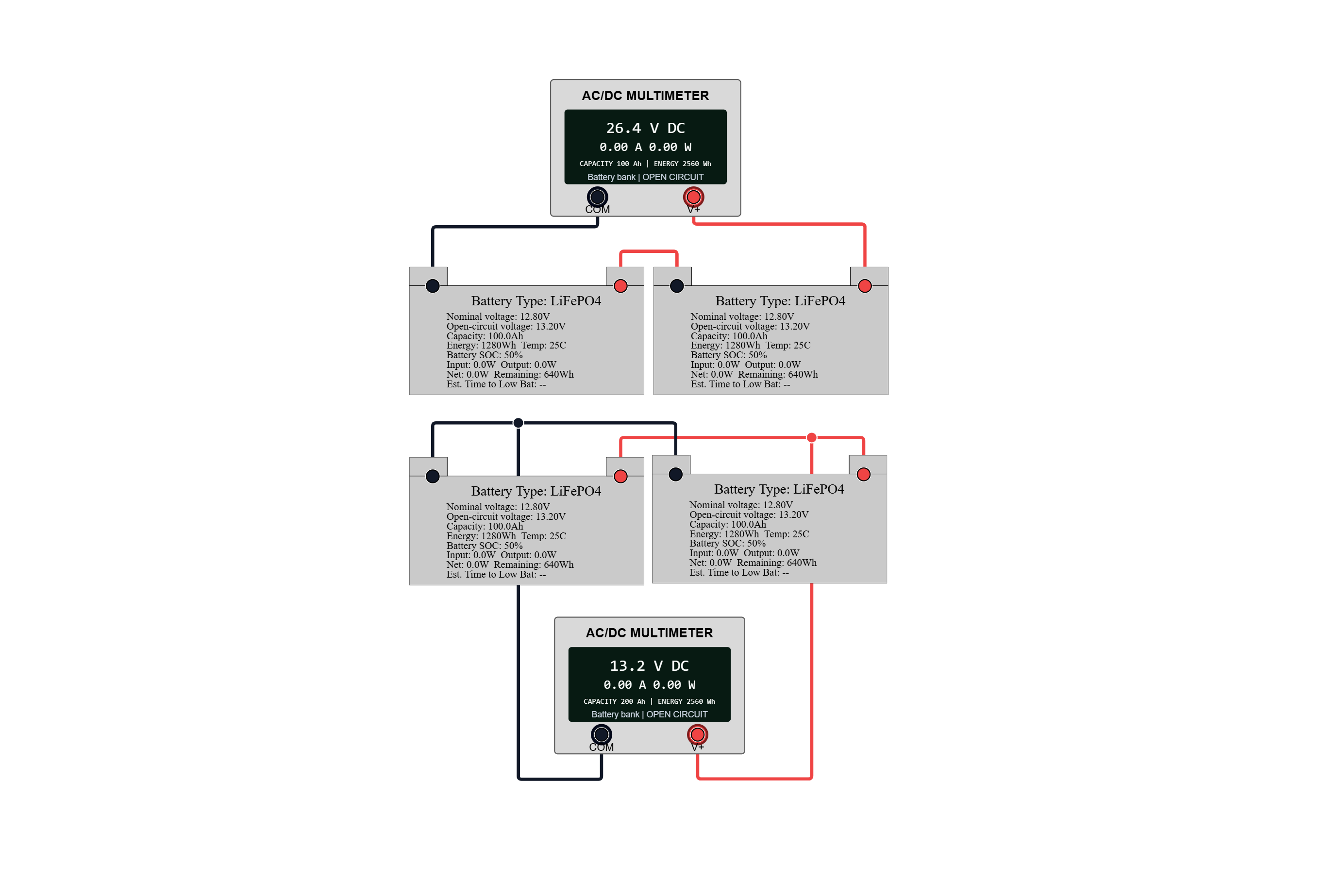
Battery Storage
Series and Parallel Battery Banks
Compare series and parallel wiring with four 12.8 V, 100 Ah LiFePO4 batteries and two multimeters.
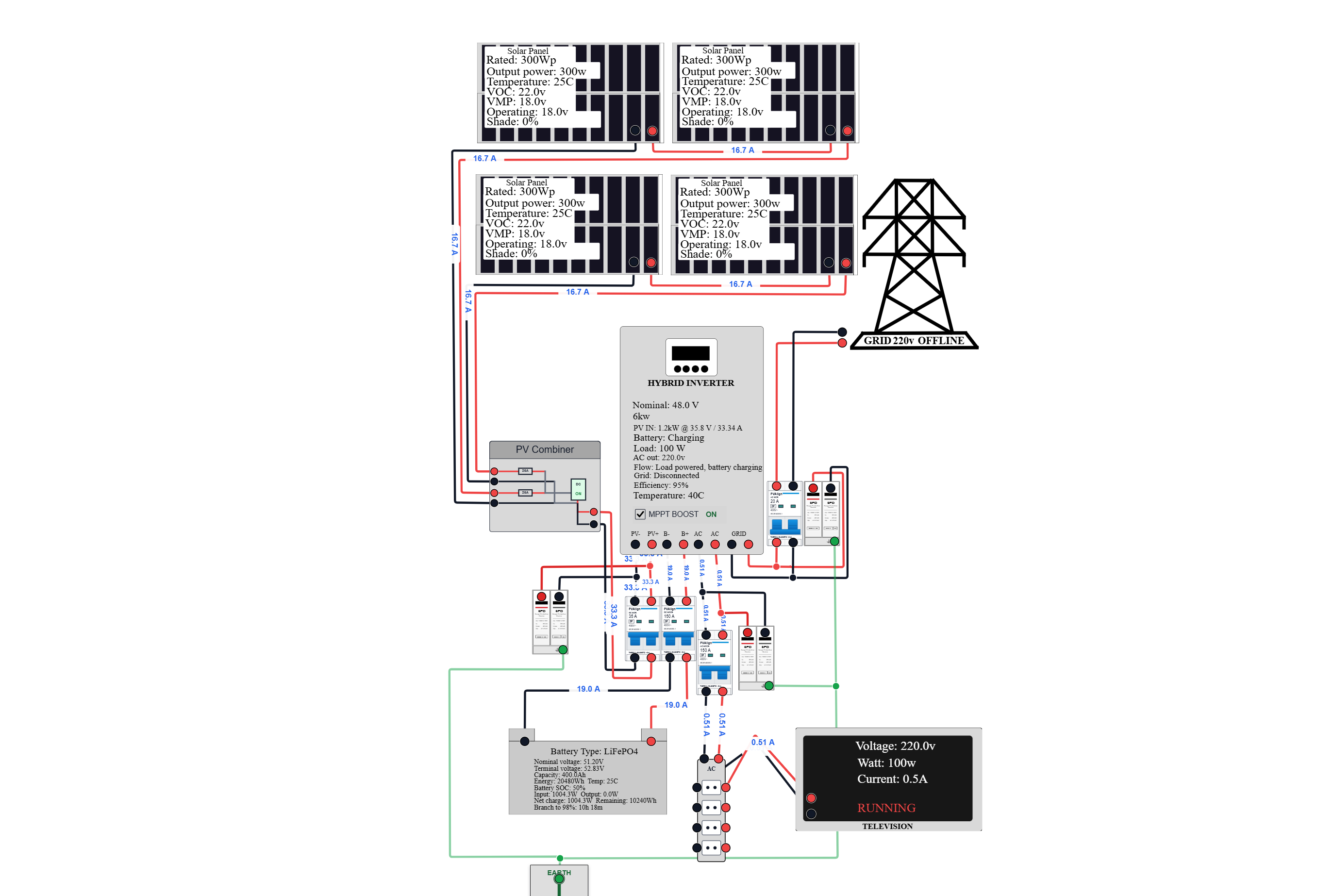
Solar Power
Grid-Tied PV Power System
Explore four PV panels, a hybrid inverter, battery storage, grid power, and a household load with breakers and surge protection.
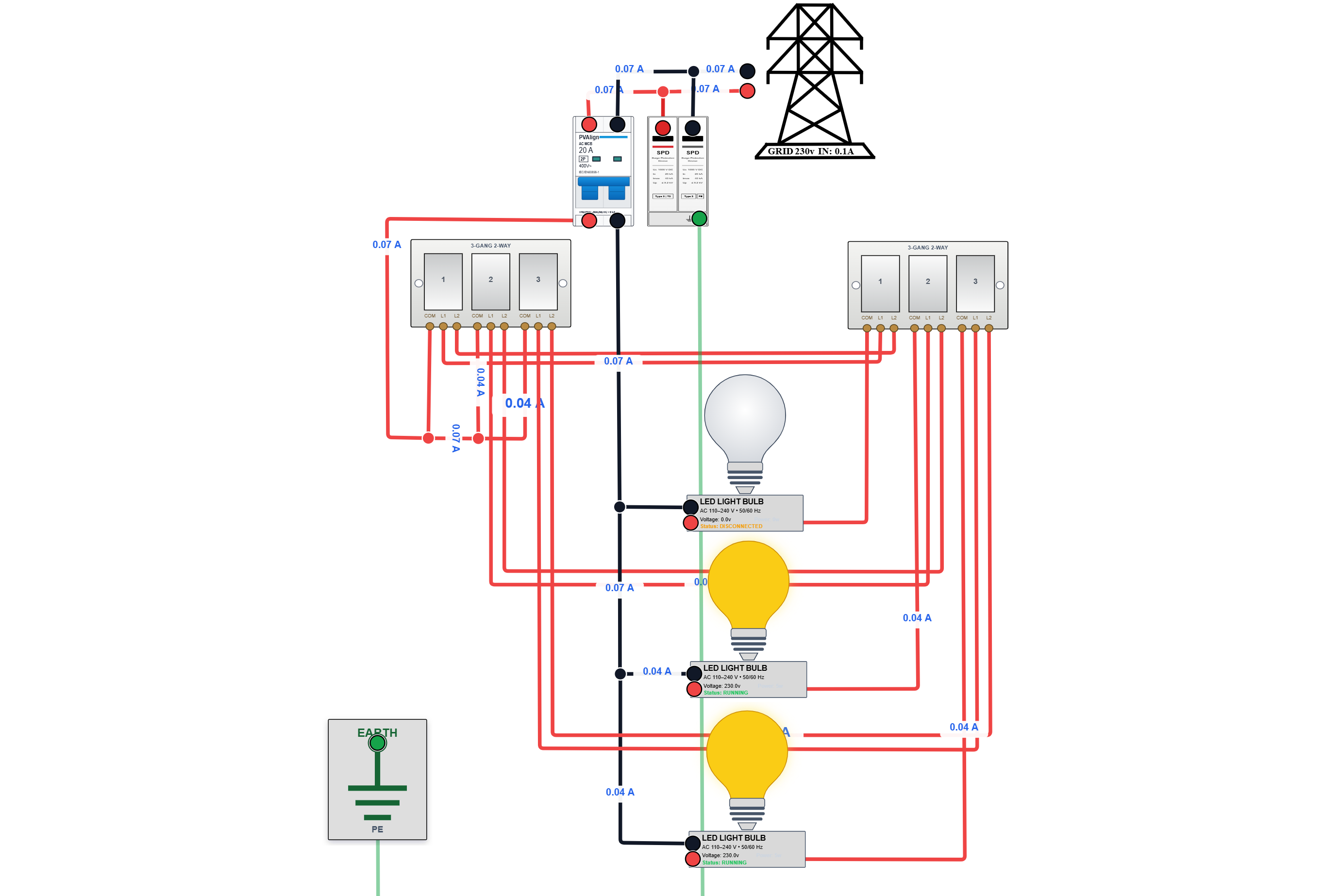
AC Lighting
Two-Location Wall-Switch Lighting
Follow the wiring for three LED lamps controlled from two three-gang wall switches, with grid power, a breaker, and surge protection.
Featured Guide
What Is PVAlign? 2D & 3D Solar Simulator Guide
Choose PVAlign's 2D circuit canvas or 3D solar simulator. Learn about component ratings, PV input limits, wiring, Walk and Monitor modes, modeling, and saved projects.
Reading room / 07
Latest articles
September 25, 2026 · 12 min read
Can You Use a Motorcycle Battery With a Solar Panel to Run Small Appliances?
A 12 V motorcycle battery can store solar energy and run very small loads, but its capacity, charge-rate limits, and starting-battery design make it a poor deep-cycle storage choice. A PVAlign simulation shows what one 4 Ah battery can really do.
September 25, 2026 · 12 min read
Why a Relay and an LVD Matter in a Small Solar Setup
A small solar setup can still drain its battery to a damaging depth of discharge. Learn what a low-voltage disconnect (LVD) and an SPDT relay actually do, how the two work together, and how to wire and size them for a small 12 V system.
August 11, 2026 · 41 min read
What Is PVAlign? 2D & 3D Solar Simulator Guide
Choose PVAlign's 2D circuit canvas or 3D solar simulator. Learn about component ratings, PV input limits, wiring, Walk and Monitor modes, modeling, and saved projects.
News desk / 08
Latest solar news
September 29, 2026 · 6 min read
NGCP Seeks Nationwide Inventory of Rooftop Solar Installations
The National Grid Corporation of the Philippines is pushing for mandatory tracking of rooftop solar installations, warning that unrecorded systems could complicate grid management as distributed generation grows.
August 22, 2026 · 7 min read
New Solar Panel Glass Coating Could Improve Light Transmission and Cooling
Researchers have developed a porous silicon dioxide coating for solar panel glass that could reduce reflection and improve passive heat release, potentially helping future PV modules use sunlight more effectively.
August 19, 2026 · 9 min read
Can Hail Damage Solar Panels? New 35 mm Hail-Resistant Modules Explained
New n-type glass-to-glass solar modules have been qualified for 35 mm hail impacts. Here is what hail resistance really means, how panels are tested, and what solar owners should know.
Build and Explore Complete Solar Power Systems
Choose the 2D circuit canvas or the 3D solar simulator to build solar, battery, grid, and hybrid circuits. Compare battery-only, grid-only, off-grid, and PV + battery + grid operation while testing charge controllers, inverters, automatic transfer switches, breakers, fuses, wiring, meters, and realistic household loads.
Open 2D simulator · Open 3D simulator · Plan Equipment Budget
- 22 educational articles
- Free interactive simulator
- 24/7 learning access